



Shopi5ProRequest a Quote

ANONYMISED CASE STUDY · AUTOMATION & INTEGRATIONS

One Automation Platform for a Multilingual Shopify Retailer.

A growing store had automations spread across separate tools and scripts, data in many places and an email agency already running its main flows. The work brought the automations onto one monitored platform, added marketing, multilingual and reporting workflows around the agency's own, and made every run visible.

Anonymised client project · Automation & Reporting

Illustrative automation monitor listing scheduled jobs such as the low-stock alert, back-in-stock detection, competitor catalogue scan, customer tagging, translation sync, flow performance sync, order attribution sync and the watchdog, each with its schedule and a completed status.

Illustrative example · layout, not a client screenshot

Project Overview

This is an ongoing engagement rather than a single fix. The aim was to give the store one dependable place for its automations, then build marketing, multilingual and reporting workflows on top, each one tested before launch and monitored after it.

Anonymised client project: Anonymised multilingual Shopify retailer. Selected projects are anonymised to respect client confidentiality.

Client
Anonymised multilingual Shopify retailer
Platform
Shopify, email platform, analytics and social channels
Focus
Automation, integrations, multilingual workflows and reporting
Status
Live in production, with further work in development
Evidence
Run log, test records and written client sign-offs

What we found

The Challenge

The store's automations had grown up across no-code workflows and standalone scripts, so nobody could see at a glance what had run, what had failed or what depended on what. Store, email, search and social data lived in separate tools and did not always agree. An external agency already ran the main email flows, so any new automation had to add to theirs rather than compete with them.

  • Automations nobody could see

    Workflows had grown up across no-code tools and standalone scripts, with no single record of what had run or failed.

  • Data that did not agree

    Store, email, analytics and social data sat in separate tools, and order counts in analytics did not always match the store's own records.

  • An agency already in the inbox

    An external agency ran the main email flows, so new automation had to fill gaps in their programme rather than duplicate it.

  • Translated pages outside the store

    Other-language pages were served through a third-party proxy rather than the store's own markets and translations.

Before changing anything

Our Investigation

We started by listing every existing automation: what triggered it, which system it wrote to and who owned the result. We mapped which emails the agency already sent, so new triggers would fill gaps instead of duplicating them, and compared order records in analytics with the store's own orders to see where reporting disagreed.

  • Inventory of existing automations, their triggers and their outputs.
  • Map of the email flows the agency already owned.
  • Comparison of analytics orders with the store's own order records.
  • Review of how other-language pages were being served.

Simplified architecture: the Shopify store, email platform, analytics, search data, social channels and public competitor catalogues connect to one platform with a worker, job queue, database and run log, which produces alerts, email trigger events, translated content and reporting views.

How We Approached It

Move what exists onto one platform first, then add new workflows one at a time, each with its own test and sign-off.

  1. Inventory

    What exists

    • Every automation, trigger and output listed
    • Agency-owned flows mapped
  2. Consolidate

    One platform

    • Worker, job queue, database, dashboard
    • Earlier scripts retired
  3. Add in layers

    One workflow at a time

    • Drafts until written sign-off
    • Test sends to one internal address
  4. Monitor

    Every run

    • Run log and dashboard page
    • Watchdog alerts on errors and overdue jobs
  5. Report

    Read-only views

    • Flow, social and attribution views
    • Figures checked before they reach the client

The work completed

The Technical Solution

Marketing triggers that add to the agency's flows

The platform sends server-side events to the existing email platform, so lifecycle emails such as a win-back for top customers, a second-purchase nudge and back-in-stock messages run alongside the agency's flows without replacing them. On product pages, a sold-out size now offers a sign-up in the shopper's language that feeds a daily restock check and a back-in-stock email.

Back-in-stock workflow: a shopper signs up for a sold-out size on the product page in their language, the sign-up is stored, a daily job checks for restocks, and an event triggers the back-in-stock email.

Multilingual by default

The store's pages are translated natively, with a daily sync so new and changed content is translated too. A language selector and restructured markets put each language on the store itself, and the old proxy addresses redirect permanently to the native pages. New articles are also translated for a second-language audience as they are published.

Translation workflow: new or changed store content is translated into each store language by a daily sync and published on the store's own markets, while old proxy addresses redirect permanently to the native pages.

Reporting the team can rely on

Email flow performance, social activity and order attribution are synced into reporting views behind a read-only client login. A data clean-up matched analytics orders against the store's own records and set out reporting rules, agreed with the client in writing.

Illustrative reporting layout with figures removed: email flow performance, social activity, order attribution and the run log, behind a read-only client login.

Stock and catalogue monitoring

A daily low-stock alert covers the store's own-made lines, back-in-stock changes are detected daily, and a weekly scan of public competitor catalogues records price changes. An AI shopping assistant on the storefront was rolled out to every visitor only after a controlled holdout test.

Delivered, item by item

  • A single platform for the store's automations: a background worker with a job queue, a database and a dashboard, replacing the earlier scripts.
  • Daily stock monitoring, back-in-stock detection and a weekly scan of public competitor catalogues.
  • Server-side events that trigger lifecycle emails in the existing email platform, alongside the agency's flows.
  • A sold-out size sign-up on product pages in each store language, connected to a back-in-stock email.
  • Native store translation with a daily sync, a language selector, and old proxy addresses redirected to the native pages.
  • Reporting views for email flow performance, social activity and order attribution, behind a read-only client login.

In development

Still in Development

These are under way or planned. None of them is part of what this case study describes as delivered.

  • Trend watch

    Weekly trend lists drawn from public competitor catalogues, in a trial with the client. The runs are still started by hand.

  • Profit reporting

    A data warehouse bringing ad spend, attribution and margin together, planned as later phases of the data work.

  • Real-time store events

    A webhook receiver is in place, but no store events are connected to it yet; the jobs above still run on a schedule.

Evidence

Verification and Substantiated Outcomes

Each automation was checked before it went live and is watched after. The case study describes what was built and how it is monitored; it does not claim a revenue, conversion or time-saving figure, because none has been established for publication.

How the Work Was Checked

  • Every scheduled job writes to a run log with its own dashboard page, and a watchdog emails when a job errors or is overdue.
  • New email flows stay in draft until the client signs off in writing, and test sends go to one internal address.
  • Discount codes are created in the store and redeemed in a test before any email that uses them goes live.
  • An automated test suite covers the platform, and deployments come only from version control.
  • Client access and reporting access are read-only: they can view data but cannot change anything.
  • Figures pass a check and an independent review before they reach the client in a report.
Verification record
AreaStatusNote
Scheduled jobsVerifiedEvery run is recorded in a run log, and a watchdog emails when a job errors or is overdue.
Email triggersVerifiedFlows stay in draft until written client sign-off; discount codes are created in the store and redeemed in a test first.
Back-in-stock sign-upVerifiedTested end to end, from the product page sign-up to the email.
Order attributionCheckedAn audit found one data lane recording nothing; it was fixed and rechecked.
BackupsVerifiedEncrypted nightly off-site backups, with a restore tested.
Revenue impactOut of scopeNot established for publication; no revenue, conversion or time-saving figure is claimed.

What the Evidence Shows

The records confirm which automations are live, how they are tested and how they are monitored. They do not establish a revenue or conversion uplift, and none is claimed.

What the Project Delivered

  • One place for automations

    A single monitored platform in place of scattered scripts, with a record of every run.

  • Workflows around the agency

    Marketing triggers and multilingual workflows that add to the agency's programme rather than duplicating it.

  • Reporting with rules

    Read-only reporting views and written rules for how the numbers are counted.

What you receive

The Report You Receive

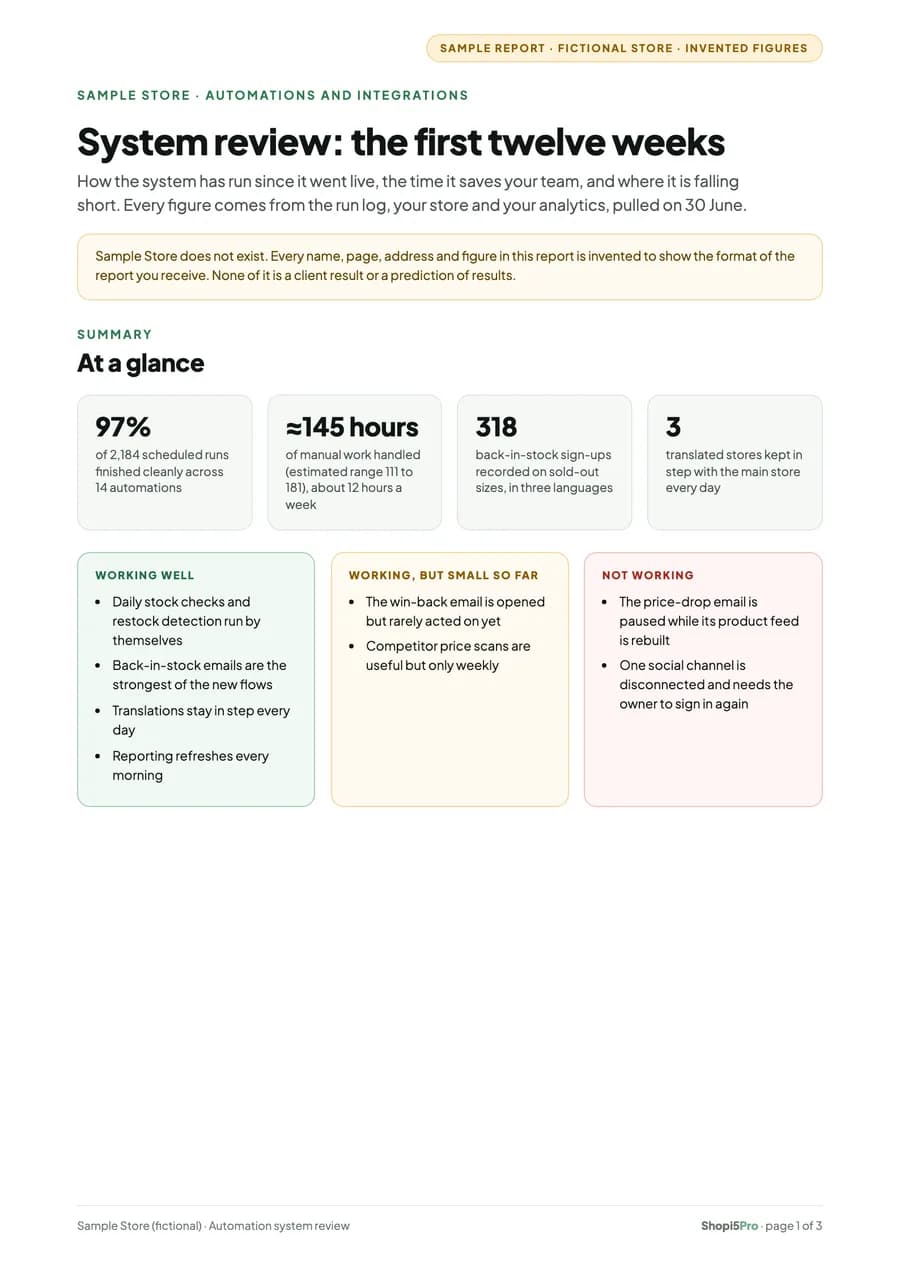
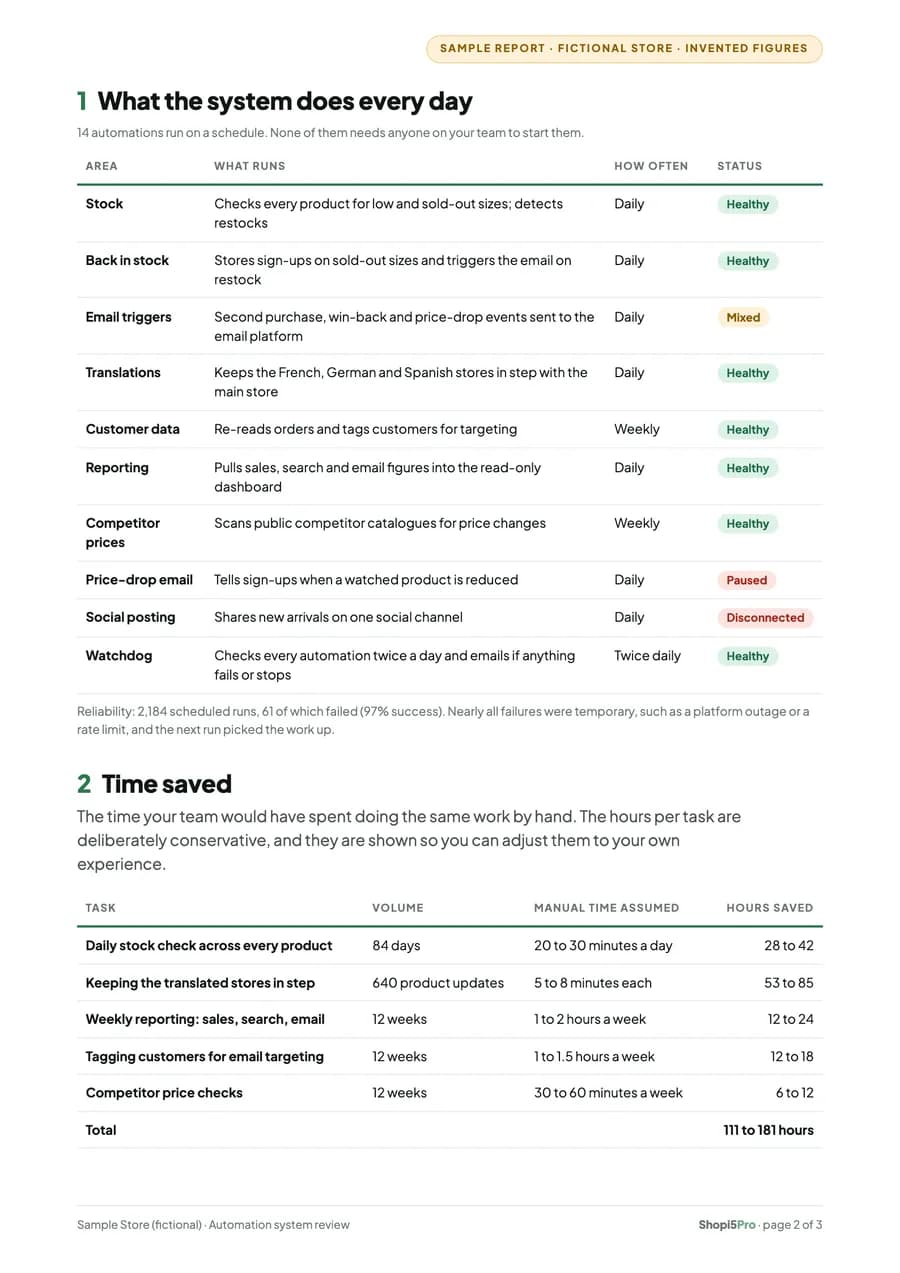
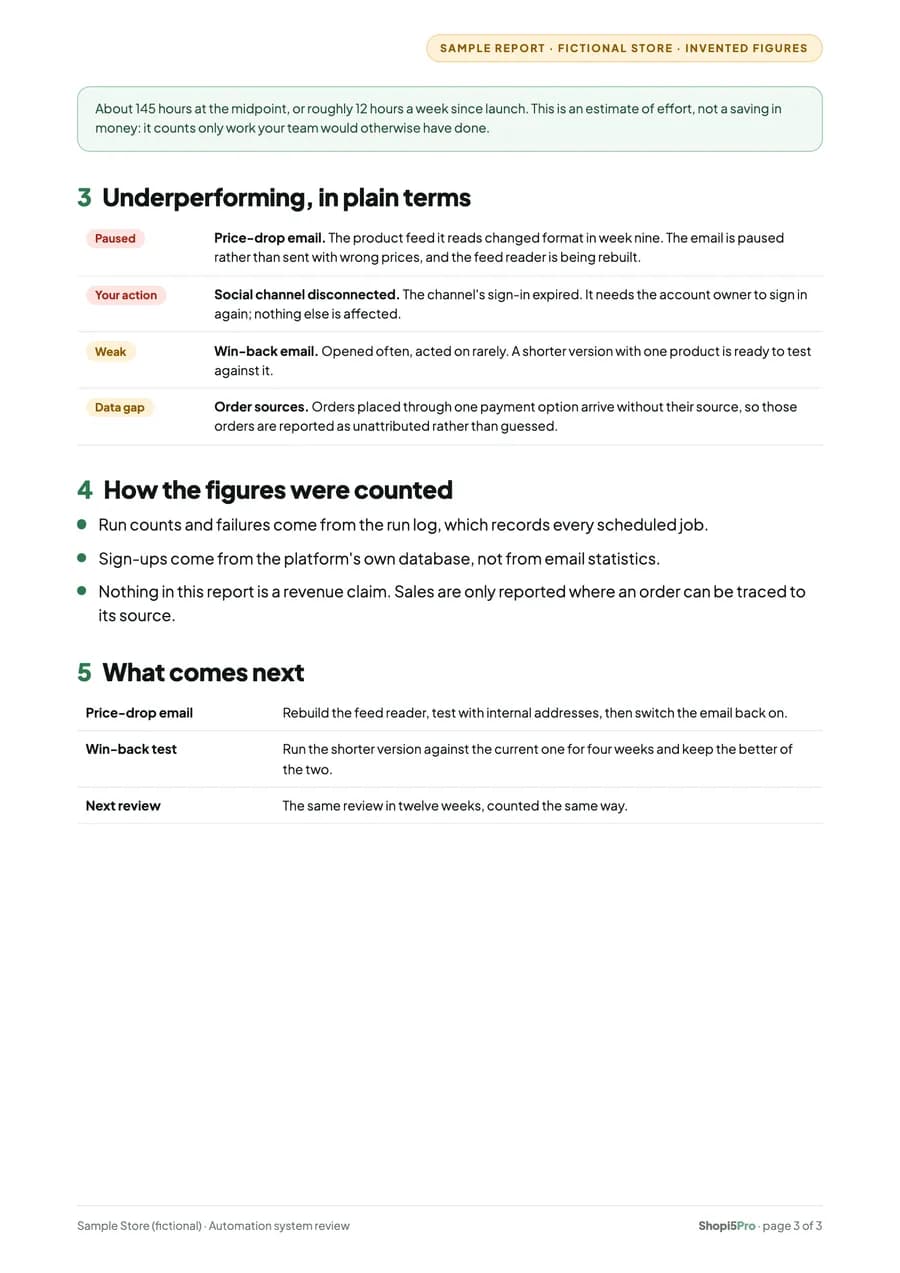
Automation work is reviewed in writing: what runs every day and how reliably, the time it saves your team, and what is falling short, in plain terms. This sample uses a fictional store, so every name and figure in it is invented.

Sample report · fictional store · invented figures

What's inside

  • At a glance: what works, what is small so far, what is not working
  • Every automation, how often it runs and its status
  • Time saved, with the assumptions shown
  • What is underperforming, and what comes next
Open the Sample Report (PDF) (opens in a new tab)

3 pages · A4 · opens in a new tab

Why This Matters for a Store

Automations that run quietly in several places tend to fail quietly too. Putting them on one platform with a run log and alerts means a missed job is noticed the same day, the store's team can see what ran, and new work can be added without upsetting what an agency or another tool already does.

Project details are anonymised. Work described as delivered is live in production; work still in development is shown separately and is not presented as delivered.

All services
  • Automation & Tools

    Automations & Integrations

    Connect Shopify to the systems your business relies on and reduce repetitive manual work.

    Explore Integrations
  • Automation & Tools

    Dashboards & Business Tools

    Turn scattered operational data into useful reporting and practical custom applications.

    Explore Business Tools
  • Automation & Tools

    AI Workflows

    Build tailored AI-assisted workflows with human oversight, clear safeguards and useful outcomes, for Shopify stores and for businesses that don't use Shopify at all.

    Explore AI Workflows

Further Reading

Guides and case studies that explain this work in more depth.

Have a Similar Challenge?

Tell us which tasks your team repeats, which tools are involved and where the data stops agreeing. We'll suggest what is worth automating first.

You don't need a technical specification. A description of what you're seeing is enough to start.

Helpful to include

  1. The tools and apps you use today
  2. The manual tasks that take the most time
  3. Who needs to know when something fails

Enquiry about: Automations & Integrations

Tell us what's happening, what you'd like to achieve and anything relevant about your setup. At least 30 characters.

Please don't include passwords, API keys or sensitive customer data in this form.

Prefer the full form? Use the contact page